How to Display Prayer Times on Your Mosque TV
A plain-English guide to putting live prayer times and iqamah countdowns on your mosque's TV — what you need, the setup routes, and keeping times right.
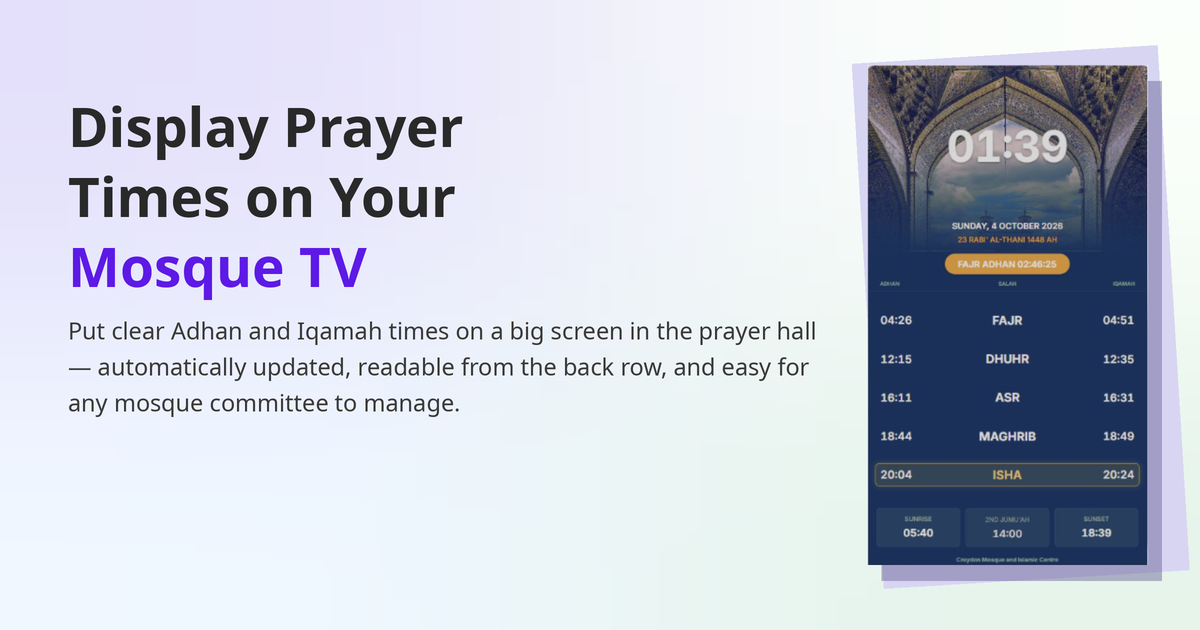
Almost every mosque already has the hardest part of this project hanging on the wall: a TV. The question is how to get accurate prayer times, iqamah countdowns and notices onto it — without a volunteer standing there with a USB stick every week.
This guide walks through what you need, the three ways mosques usually do it, and the details that decide whether the screen helps your congregation or quietly shows the wrong time in July.
What a good mosque TV display shows
- Today's prayer times (Fajr, Dhuhr, Asr, Maghrib, Isha) and Jumu'ah
- The iqamah time for the next prayer, with a live countdown
- The Hijri date next to the Gregorian date
- Notices — classes, events, funeral announcements, appeals
- A calm screen during the prayer itself (many mosques dim or blank the display when salah begins)
If your screen shows only a timetable photo, it is doing about a third of this job.
What you need
- A TV — any modern Smart TV works. Android TV and Amazon Fire TV give you the smoothest route because you can install an app; Samsung (Tizen) and LG (webOS) TVs can usually open a web-based display instead.
- An internet connection for setup — and, ideally, a display system that keeps working if the internet drops. Prayer times must never depend on the Wi‑Fi behaving.
- Your mosque's timetable — the calculation method your mosque follows (for example Muslim World League, ISNA, Diyanet, Umm al-Qura or a local timetable), the Asr school (Hanafi or Shafi'i), and your iqamah rules.
The three setup routes
Route 1: The USB stick (where most mosques start)
A timetable image or PowerPoint on a USB stick. It costs nothing, and it shows last month's times with complete confidence. Every timetable change means a new file, a ladder, and a volunteer. Fine as a stopgap; painful as a system.
Route 2: A free prayer-times website on the TV browser
Open a prayer-times page in the TV's browser and leave it there. Quick to start, but most mosque TVs have clumsy browsers, the page is designed for phones rather than a wall, and iqamah times — the times your mosque actually prays — are usually missing or wrong.
Route 3: A dedicated mosque display system
Software built for the job: you enter your calculation method and iqamah rules once in an admin panel, pair the TV with a short code, and the screen updates itself every day — times, countdowns, notices and all. This is the route mosques choose when the screen has to be right without anyone thinking about it. It is the route MinarOS is built around: the TV app pairs with a 6-digit PIN, runs on Android TV and Fire TV (and in the browser on Samsung and LG sets), and keeps showing the correct times offline.
The details that actually matter
Iqamah is not adhan. Your screen must handle both: adhan from calculation, iqamah from your mosque's own rules — fixed times, minutes-after-adhan offsets, and seasonal changes. Check any system against your printed annual timetable before you trust it.
Ramadan changes everything. Maghrib becomes iftar, Taraweeh appears, and Fajr shifts daily. Your display should follow the Ramadan timetable automatically, not need a special file in the first week of the fast.
Notices are half the value. A screen people look at five times a day is the best noticeboard your mosque owns — far better than the paper board by the door that nobody reads. Look for a system where notices, slideshows and announcements can be updated from a phone.
Offline is not optional. Village halls, thick walls, a router that reboots at the worst moment — if the screen goes blank or freezes when the internet drops, choose a system that caches its timetable on the device.
More than one screen? Entrance, main hall, sisters' section — each screen should show the same times from one place of editing, not three USB sticks with three versions of the truth.
A simple checklist before you commit
- ☐ Does it support our calculation method and Asr school?
- ☐ Can we set iqamah as fixed times and offsets?
- ☐ Does it keep working offline?
- ☐ Can a non-technical volunteer update notices from a phone?
- ☐ Does it show the Hijri date and handle Ramadan automatically?
- ☐ What does it cost per screen, per month — and is there a free way to start?
Trying it on your own mosque's TV
With MinarOS, the first screen is free: install the TV app (on Fire TV, the Downloader code is 742918), pair it with the PIN shown on screen, choose your calculation method, and your timetable is live. The full walkthrough is on the Smart TV service page, and the app itself is on the download page.
However you do it — USB, browser or a dedicated system — the goal is the same: a screen the congregation can trust at a glance, that nobody has to babysit. Get the iqamah rules right, make sure it survives the internet dropping, and the TV you already own becomes one of the hardest-working noticeboards in the mosque.